Sawa is El Sewedy Industries' employee self-service app — GPS-verified check-in/out, leave & permission requests, payroll statements, the live org chart and profile management, all inside one secure, bilingual mobile experience.
Two short screen-recordings from the real app — no mockups. Tap a phone to play; use the controls for sound-free full playback.
El Sewedy In Sawa ("Sawa" — سوا, together) is an internal mobile application provided by El Sewedy Industries Group to its workforce. It replaces scattered HR touchpoints with a single, self-service hub that employees carry in their pocket.
From the moment an employee arrives on site and swipes to check in, through requesting annual leave, reviewing a payslip breakdown, or looking up a colleague on the organization chart — every routine HR interaction lives in Sawa. Account access and sensitive profile changes are gated behind an administrator approval workflow, keeping the company's records accurate and under control.
Design tokens straight from Figma, a strict layered architecture, and security decisions taken deliberately — the details that separate an internal tool from a real product.
Every color, radius, shadow and type scale is a named token (navy #161F6E · cyan #0DBFD6) delivered as a Flutter ThemeExtension — pixel-consistent light & dark, no hardcoded values.
A dual-token model, encrypted secure storage, JWT-aware session guarding and silent re-authentication — sessions survive network blips without ever leaking the employee token in a header.
Cubit state management with clean separation — screen → cubit → remote data source → Dio. Each feature is self-contained and independently testable.
Full English and Arabic localization (241 strings each) with automatic right-to-left layout mirroring — the app feels native in both directions.
Attendance is validated against company geofences using precise Haversine distance — remote-eligible sites pass automatically, everyone else must be genuinely on location.
A custom responsive engine scales from a 390dp design canvas across phones, tablets and large displays, honoring OS text-scaling for accessibility.
Nine modules across five bottom-nav workspaces. Badges are honest: Live = wired to the backend API, Prepared = built into the stack, not yet activated.
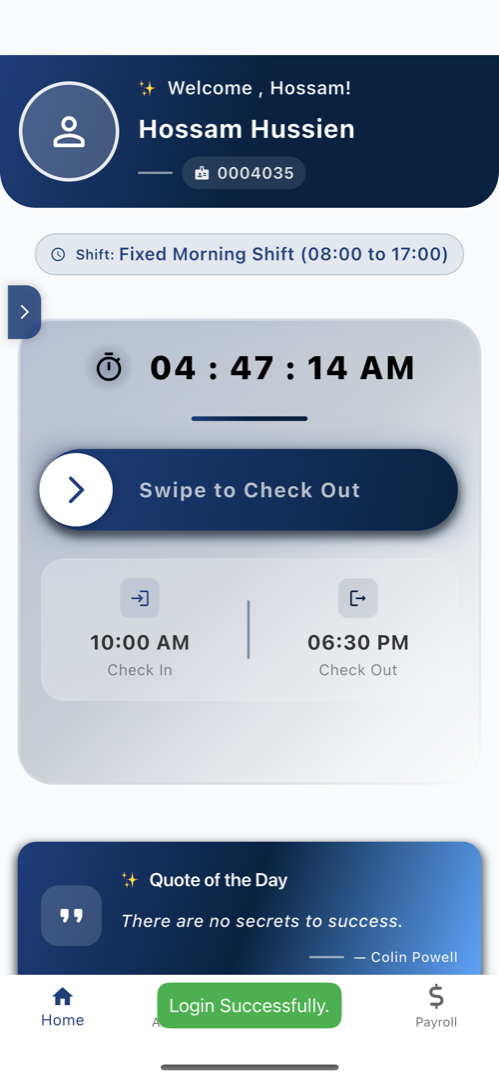
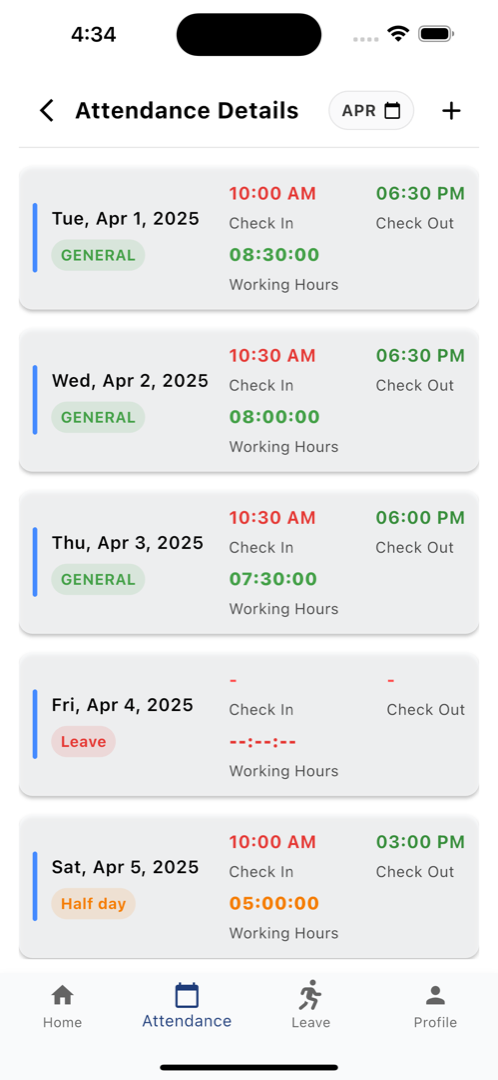
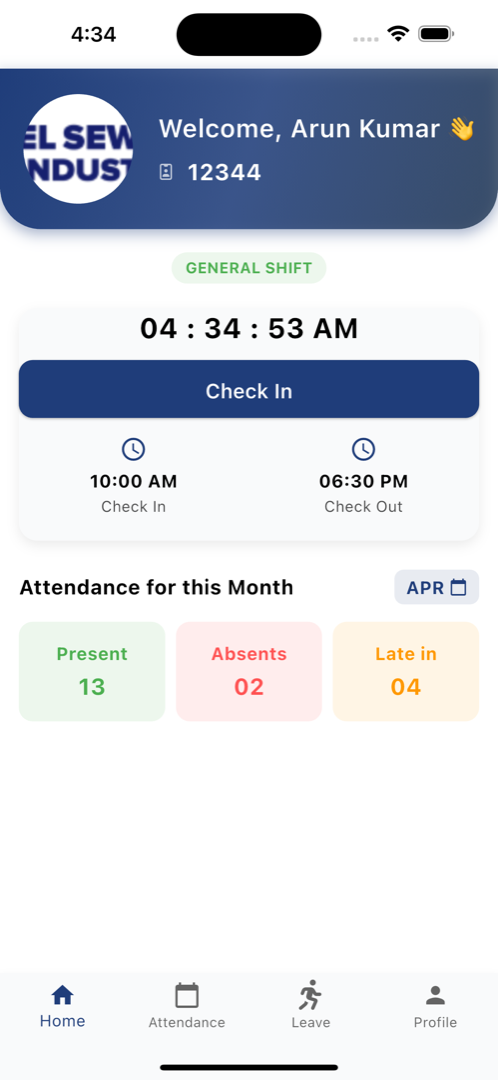
Swipe to check in / out with a live shift clock, GPS geofence validation against assigned work locations, monthly present / absent / late totals and a day-by-day working-hours log.
A personalized greeting, today's shift card, the primary check-in action, recent requests and leave balances — the day's essentials on a single scroll.
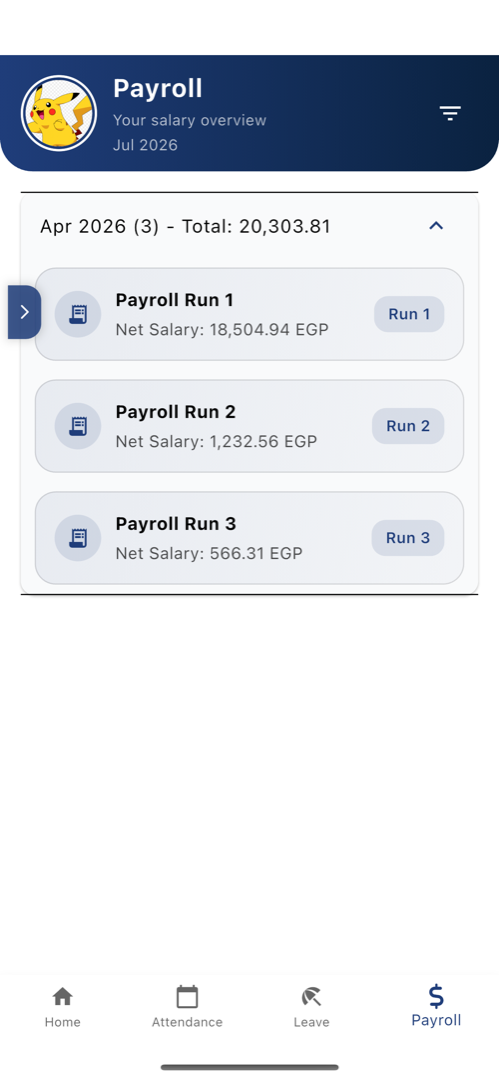
Monthly salary overview with multiple payroll runs, a full earnings-vs-deductions breakdown (basic, allowances, overtime, insurance, tax), month-range filtering and downloadable slips.
Request remote work, permissions or annual leave with date-range pickers, a permissions window and a reason note. Balances, history and a status calendar (pending / approved / rejected) complete the flow.
General, personal and professional information — job title, department, contract, contacts, family details — with an edit request that routes to administrator approval before records change.
An interactive hierarchy — managers above, the employee in the middle, direct reports below — with each colleague's photo preloaded from the staff directory.
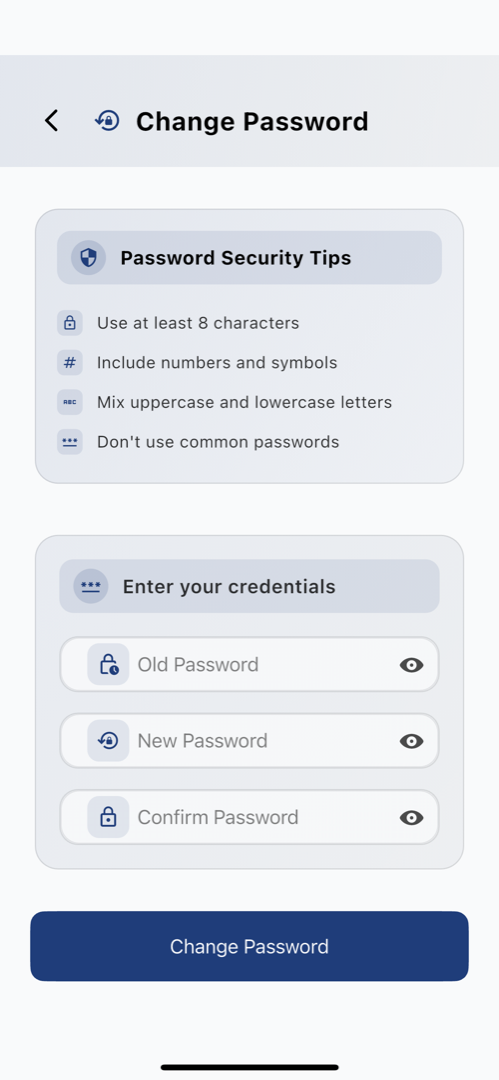
Sign in by employee code, self-register (gated by admin approval), change password with strength guidance, and secure logout with server-side session revocation.
Toggle dark mode, switch language (English / Arabic), and manage OS-level location permissions — all persisted across launches.
An in-app notifications inbox with a bell badge. The Firebase Cloud Messaging push pipeline is scaffolded in the codebase and ready to activate.
From secure sign-in to an approved leave request — the core loop the app was designed around.
Employee code & password authenticate against the gateway; the token lands in encrypted storage.
Swipe to check in — GPS confirms you're inside an assigned work-location geofence.
Track shift hours, view the payslip breakdown, browse the org chart and profile.
Pick a leave type and dates, add a reason, and submit for review.
An administrator reviews and approves; the status updates and the balance adjusts.
The app ships one in-app role — the employee. Administrators act through an approval boundary that governs who gets in and what data can change.
The authenticated user of the mobile app. Full self-service across their own data, verified by their session token.
A back-office authority (outside the mobile app) that governs access and the integrity of employee records through explicit approvals.
The admin console is a separate back-office system; the app enforces the employee side of these boundaries.
Feature-first folders, Cubit state management and a disciplined data path with a four-stage interceptor chain.
Every dependency below is declared in pubspec.yaml — no aspirational tooling.
A gateway/client JWT rides in the Authorization header; the employee session token travels only in the request body of protected routes — never exposed in a header.
Tokens and credentials are held in flutter_secure_storage (Keychain / Keystore), separated from non-secret preferences.
Local expiry checks, 401 handling and silent re-authentication keep sessions alive across network blips, while a genuine cross-device mismatch forces a clean logout.
GPS is read only during check-in / out to confirm presence at an authorized site — never tracked continuously and never shipped for any other purpose.
Note: error logging is debug-only — no crash telemetry or PII leaves the device. A build-time FALLBACK_TOKEN define supplies the gateway key for public endpoints.
Two complete locales generated with intl_utils, with automatic right-to-left layout for Arabic.
241 localized strings covering every screen, error message and form label.
241 نصًا مترجمًا مع دعم كامل للاتجاه من اليمين إلى اليسار في كل الشاشات.
Change language in Settings; the choice persists and the whole UI mirrors direction on the fly.
Employees see updates in a dedicated notifications screen with a bell badge on their profile. The Firebase Cloud Messaging pipeline — token refresh, server registration and delivery — is scaffolded in the codebase and can be switched on without re-architecting.
Push · Prepared In-app inbox · Live UI
Reporting is built into the experience rather than bolted on: a monthly attendance summary (present / absent / late), a per-day working-hours log, and a full payroll statement with earnings, deductions, tax pools and multiple pay runs — each figure sourced from the HR backend.
Real screens from the running app. Filter by area, then click any screen — use ← → and Esc in the lightbox.
Sawa is employee-facing, but every sensitive action answers to an administrator. Two gates keep the company's records trustworthy.
A new hire submits an access request with their code and national ID.
Until approval, sign-in is blocked; the app politely waits and unlocks automatically once granted.
Changing personal details submits a request rather than writing directly.
Once approved, the record updates — keeping HR data accurate and auditable.
One Flutter codebase, tuned for real devices.
It's an internal employee self-service mobile app for El Sewedy Industries. Employees use it for attendance, leave and permission requests, payroll statements, the organization chart, and managing their profile — all in one secure place.
When you swipe to check in or out, the app reads your GPS position and compares it against your assigned work locations using precise Haversine distance. Remote-eligible sites pass automatically; otherwise you must be within the location's allowed radius. Location is only read during these actions.
We label features honestly. "Live" means the flow is wired to the backend API. "Prepared" means it's built into the app and stack — like the Firebase push pipeline — but not yet switched on. We never claim capabilities the code doesn't contain.
English and Arabic, each with 241 localized strings. Arabic automatically flips the layout to right-to-left, and the language choice is remembered between sessions.
A dual-token model keeps the employee session token out of request headers; tokens live in encrypted device storage. A session guard checks JWT expiry, handles 401s with silent re-authentication, and forces a clean logout only on a genuine cross-device mismatch.
No — self-registration creates an access request that an administrator must approve before the first sign-in. The app waits and unlocks automatically once approval is granted.
Sawa is an internal El Sewedy application. The tiers below are placeholders to illustrate how a rollout could be packaged — not a commercial offer.
Multi-site, full HR suite
Group-wide with add-ons
Reach the El Sewedy HR team for a guided tour, rollout details or documentation. We'll show the live flows end to end.
Email the HR team